Reducing E-mail Spam by Eliminating Public Listings

I’ve been using Gmail as my e-mail service provider for a few years now, and due to their excellent spam filters, I’ve been able to ignore the continuous stream of junk mail hitting my mailbox every day. Despite their efficiency at identifying and hiding spam e-mails, I remain genuinely concerned about keeping my e-mail address hidden from the public view.  E-mails that are publicly available are easy targets for spambots, which are automated programs that scour the Internet for e-mail addresses. Once “harvested”, these addresses are sent junk mail, spam.
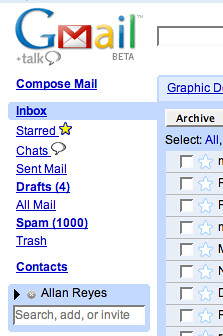
1000 Spams by Allan Reyes.

Sometimes, however, it is desirable to have an e-mail address visible to the public – to do so, a special approach should be taken to protect it from spambots. For example, you can use services like reCAPTCHA Mailhide, which challenges viewers with a CAPTCHA before it displays the full e-mail address.

Curious about whether or not my e-mail was “out there”, I decided to look into it. Below, I explain how you would go about checking for public references to your e-mail address, and how future slips could be prevented.

Google Your E-mail Address

Try searching for the e-mail address using Google. Search engines scour the Internet for web pages, rather than just specific elements in the page (like e-mail addresses). They do so through programs called crawlers, sometimes referred to as spiders. If they have indexed a webpage that has your e-mail address mentioned, you’ll be able to find it in the engine’s search results. The important fact here is this: if you can find it using a search engine, you can safely assume that a spambot would be similarly capable. It is therefore important to remove any references to your e-mail address – in doing so, you’ll be making it a little bit harder for spammers to target your address.

To do so, try launching a Google search for your e-mail address, using this format:

“you@youremailprovider.com”

The double-quotes will tell Google to look for that exact string, which will limit the number of false positive search results that are returned. If you get no results with the double quotes, try removing them.

After running the search, if you spot search results that actually have made your e-mail address publicly visible, you’ll need to try and remove them. In my case, when I did this, all the hits were sites that I could log into, and then remove my address. If you’re lucky, it’ll be that simple. Otherwise, you might have to contact the site owner to get it removed.

Question How Websites Use Your E-mail

To avoid getting into potentially complicated situations, it is worthwhile to spend some time determining how websites intend to use your e-mail. An e-mail is almost always requested when registering, but the uses vary. It could, for example, just be used to contact you to activate your account. Or, it could be used for a multitude of things, including as a publicly viewable piece of information. Take the time to check FAQs, site forums, or even contact the site owners if there are doubts – this could prevent an increase in spam received.

Sometimes, however, it isn’t as straight-forward as them displaying your e-mail address- sometimes certain sites will indirectly expose your address. I’ll give you an example… consider Google Profiles. By default, the URL that points to your profile looks something like this:

http://www.google.com/profiles/114973454253911341512

You can, however, choose to have your username appear at the end, like this:

http://www.google.com/profiles/youruseraccount

This is naturally better for search engine optimization, and it also allows you to memorize your profile link – but it introduces a flaw as well. Looking at that URL, I know that the e-mail address “youruseraccount@gmail.com” exists. It has to, that’s how Google accounts work – they are based on an e-mail address, so there is no doubt about what the username portion is. If I know that, then I can deduce that there must be a spambot out there that is smart enough to exploit the same flaw. Even if no spambots are currently exploiting this, I’m pretty sure one eventually will. Thankfully, though, Google has explained the feature very well on the settings page – reducing the likelyhood that someone would enable it unknowingly:

To make it easier for people to find your profile, you can customize your URL with your Google email username. (Note this can make your Google email address publicly discoverable.)
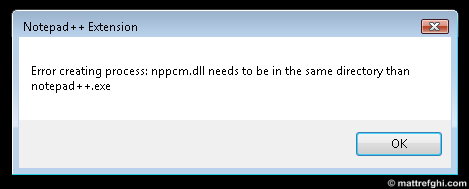
Notepad++: “nppcm.dll needs to be in the same directory than notepad++.exe”

In the last few weeks, I’ve been having problems launching Notepad++ from the context menu as I usually do. Instead of it launching properly after I select the “Edit with Notepad++” option, I get an error:

Notepad++ error dialog showing the message "Error creating process: nppcm.dll needs to be in the same directory than notepad++.exe"

To get around the error, I had to use the File-Open menu from Notepad++, and locate the file I wanted to open. This was acceptable for a while, but eventually my patience with the issue wore thin.

Solution

I figured out why it was happening. The problem was that the “notepad++.exe” file was set to automatically prompt for administrative privileges via User Account Control. This works fine if you’re launching Notepad++ from a start menu or desktop shortcut, but apparently the context menu didn’t like the setting.

To “fix” this problem, remove the automatic UAC prompt from the Notepad++ shortcut/executable. This restores the context menu option to working order. Matt, what if it needs administrative privileges, you say? Well, as far as I know, the only feature that actually needs administrative privileges is the Update feature. This means you’ll have to launch Notepad++ with administrative privileges manually whenever you want to check for updates, which isn’t great… but at least the above error is no longer an issue.

If that doesn’t work for you, I’ve heard of others that solved this issue by deleting a mysterious extension-lacking “Program” file in their hard-drive root; however, the file didn’t exist on my system. Given how out-right bizarre this file sounds, I would highly recommend you avoid taking that approach – it just doesn’t sound right. I don’t see why Notepad++ would save a file in the root – and if they are going to do so, why name it in such a generic fashion? In any case, if any of you spot this file… please let me know what it contains.

Update: Many thanks to Bram, who wrote a comment about encountering  the “Program” file:

“I had the same problem here, and I also had the file called ‘Program’ in the root folder. That file was 0 KB, so completely empty. It’s not guaranteed that notepad++ somehow creates this file. Anyways, after rebooting the machine, my Windows Server 2003 came up with a warning that there was a file called program in the root which may cause other programs to function incorrectly bla bla bla. Renaming into Program1 solves the issue, and so does deleting the file completely.”

Converting Formatted Text from the Clipboard to Plain Text

Usually when I copy text from web pages, I really don’t want the formatting from the webpage to be kept. I  just want to have the text in the simplest format possible, and then I can set my own styles. Unfortunately, this isn’t normally how it works. Typically, when copying from a web page in a browser, it may also copy any tables, images, and styles that are applied to or mixed with the text. This does depend on where you are pasting the text, though. In my case, I use Microsoft Word most of the time. Word supports a lot of web page elements, meaning they will likely appear in the Word document.

Consider the following text:

This is some example text. You’ll notice that numerous styles are appliedwarning

Here are some bullet points:

  • One
  • Two
  • Three
    • Three Part 1
    • Three Part 2
  • Four

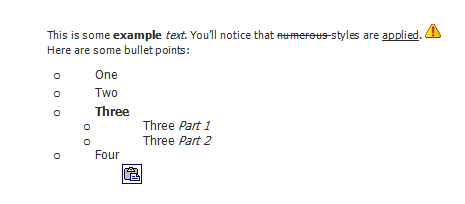
If I wanted to copy that text to Microsoft Word, here is what I’d see:

pastedtoword

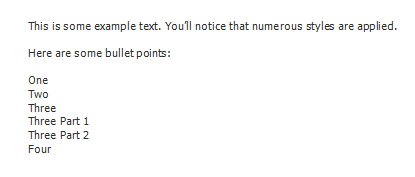
The formatting is mostly intact. What if you didn’t want that? What if you just wanted plain text, and you wanted to choose your own styles from scratch? There is one way to do it from within Word (click the wordbutton1 button for these options), but I’ll show you how to do it without such a  feature. To achieve this, I paste the text into Notepad. Yes, Notepad – the simple text editor provided by Windows. Here’s what the text will look like, once pasted:
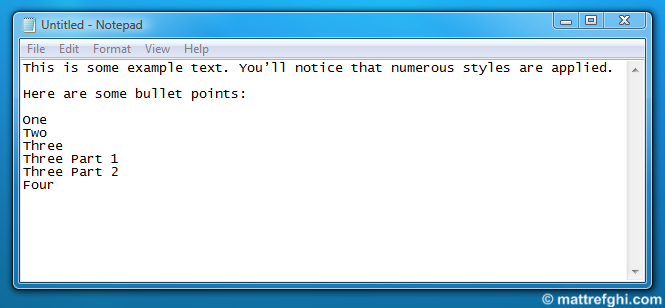
Notepad will remove formatting from any text you paste into it.

Notice how the image is gone, and all the styles are removed? Now you can copy this text instead, and paste it in Word:

pastedtowordplaintext

No more styles, bullets, or image. You can now style it exactly as you want, without having to start off with the same formatting as the web page. This isn’t, perfect, though – you may have to make corrections to the plain text copy in Notepad, as the removal of the formatting sometimes leaves the text with improper indentation.

I’ve used this little trick in a few different scenarios. Here’s an example: Sometimes I include a quote from a website in my e-mails. The default format for my e-mails is rich text, but when I include something from another source, I really don’t care about formatting – I’ll set my own formatting to suit my e-mail. If I just copy paste the quote into my e-mail, it will include the formatting – this usually ruins the look of my e-mail. To prevent this, what I do first is use Notepad to destroy the formatting, and then paste the plain-text version into my e-mail.

The Snipping Tool Is Not Working On Your Computer Right Now

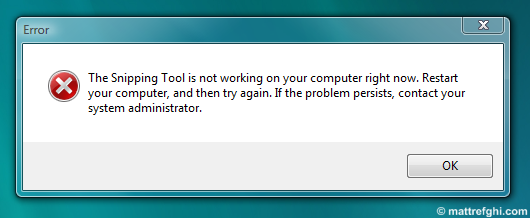
In a previous post, I described a screen capture application included with Windows, called Snipping Tool.  Since then, I’ve been using it regularly for my screen capture needs. That is, until I realized an interesting flaw: the application, after a few uses, stops working. In Vista, here’s the error message I get:

The Snipping Tool is not working on your computer right now. Restart your computer, and then try again. If the problem persists, contact your system administrator.

It eventually appears when you try to launch the tool, preventing you from using it. The advice the dialog offers (restarting your computer and then trying again) is totally unacceptable, in my mind. Because of this problem, I could not rely on the tool – so I instead started using Jing more often. Eventually, I tried to see if I could do something to fix this problem whenever it occurred.

Solution

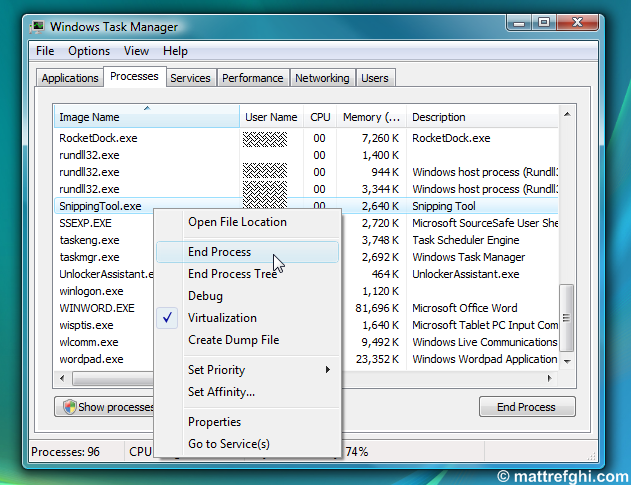
The solution I found was to kill the Snipping Tool process, and then re-launch it. This way, rebooting isn’t necessary. Simply fire up Task Manager, right-click the SnippingTool.exe process, and select End Process:

End the "SnippingTool.exe" process using Task Manager

Once the process has been killed, you can try re-launching Snipping Tool – it should now start up correctly.

If that doesn’t fix it, and rebooting also doesn’t, you might need to run Office Diagnostics – other users have had success with that.

See Also

Enabling Theme Support in Windows Server 2003

Microsoft’s Server operating systems are specifically aligned to offer, above all, top reliability and performance. It is therefore no surprise that Windows Server 2003, at first glance, seems to lack the standard Luna desktop theme that XP users have been accustomed to. Here’s the thing: The feature isn’t missing, it’s just “hidden” by default. Solution Here’s how to enable it:

1) Open the Services Management Console by entering “services.msc” in the Run dialog.

To open the Run dialog, click Start > Run, or press Windows Key + R.

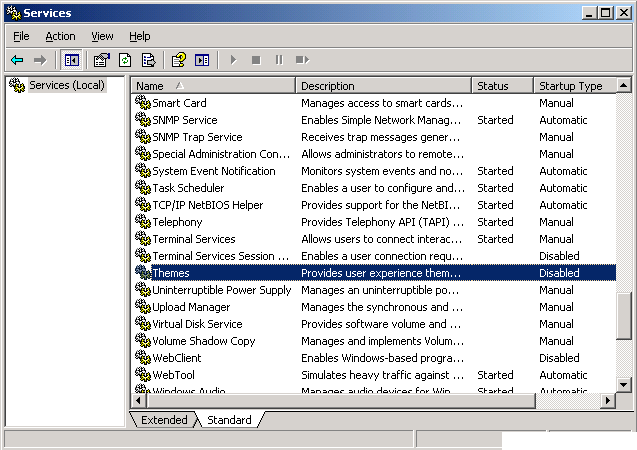
2) Locate the Themes service, right-click it, and select Properties.

Screenshot of the Services dialog, with the Themes service selected.

3) On the General tab, select the Startup Type dropdown, and choose Automatic.

4) Click Apply.

5) Click OK.

6) Right-click the Themes service again, and select Start.

7) Close the Service Management Console.

8) Right-click on the desktop, and select Properties.

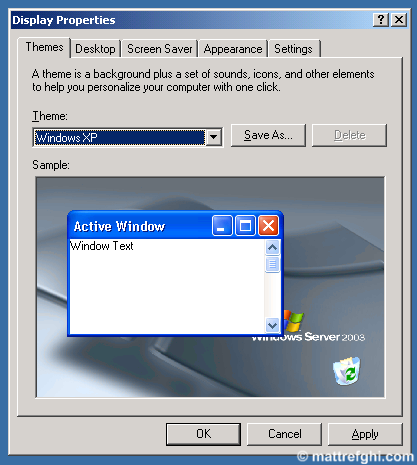
9) On the Themes tab, select the Theme dropdown, and choose Windows XP.

10) Click Apply.

11) Click OK. The Windows XP option, by default, is not listed as an available theme in the Display Properties dialog. When we started the Themes service, the option was added… and there you have it. You can now use the XP theme (Luna), in a Windows Server 2003 environment.

A screenshot of the Themes tab of the Display Settings dialog, with the Windows XP theme selected.

How to Learn More About the Background Pictures Featured on Bing

When Microsoft announced their new Bing search engine, I was immediately curious about how it compared to Google. I changed Bing to my default search engine, and tried using it daily. Ultimately, I returned to Google, which always seemed to have slightly better search results – in most cases. Despite this fact, I visit Bing it at least once a day  – but not to search. I visit it daily specifically to see the new background image they are using. They change this background image every day, and each one is usually impressive. In fact, in most cases, seeing it actually makes me want to find out more about what I’m seeing.

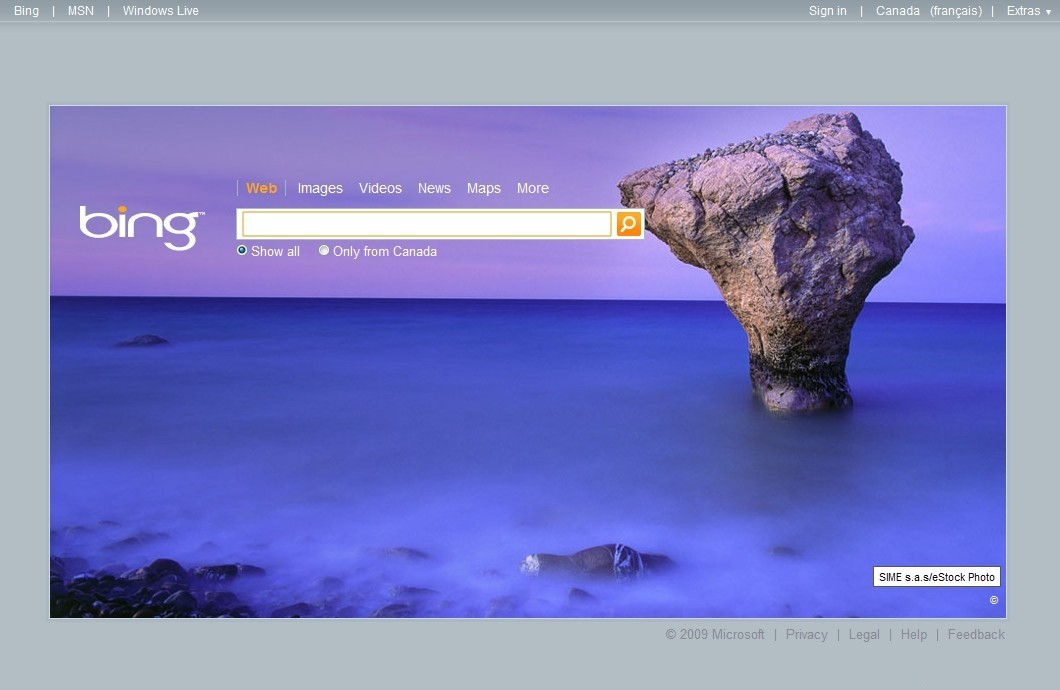
As an example, consider the following screenshot:

Bing background for July 5th, 2009.

Great image – the type of image that makes me want to know more. This brings us to the problem, though. Bing doesn’t actually tell you anything about what you’re seeing – other than the copyright information. They do give you more information if you are using the United States version of the site – but I’m Canadian. Not only that, but they don’t have the same images on the United States version of the site. Essentially, this means I’m stuck trying to figure out what the photo is depicting, by myself. I found a pretty simple, albeit manual solution: looking at the source code of the page. The background image filename is actually prefixed with some text, in this case, “CalabriaCoast”:

http://www.bing.com/fd/hpk2/CalabriaCoast_EN-CA1974044658.jpg

Once you have that name, you’re in business – search for that text on the web, and you’ll likely find some informative pages among the top results. Worse case, if you don’t have anything useful on the first few pages, at least you have a lead to work with. In my experience, once you have that name – you have it all. That is, of course, if the picture is of something unique, rather than yesterday’s photo: “Zebras”. If you were interested in where the zebras were, you’d have to guess based on the photo alone.

Now… as for how to actually find that name – I have a pretty quick process. I’ll explain how to do it here – covering the major browsers – but keep in mind, these methods aren’t very elegant – some of them require the use of developer tools. I hope Microsoft eventually makes this easier for regular users… and while they’re at it, people that don’t live in the United States.

How to Find the Bing Background Filename Using Your Browser

Google Chrome 2

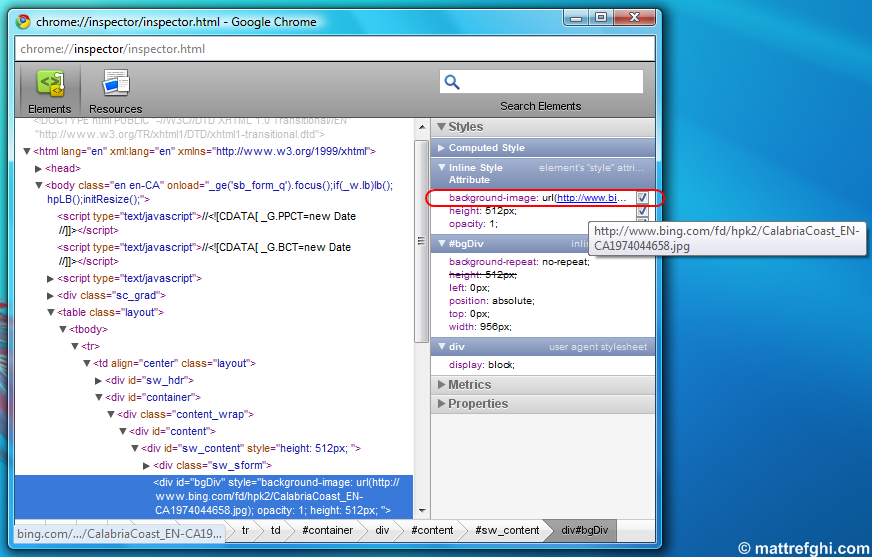
An example of how to use the Google Chrome Inspector to locate the Bing background filename.

Using Google Chrome

  1. Right-click the background image.
  2. Select “Inspect Element”.

A window appears with the element selected – notice on the right sidebar, you’ll see a URL that is partially cut off. Hover your mouse over this URL, and a tooltip will appear – revealing the whole thing. You can even right-click it, and copy it from there. See the screenshot.

Internet Explorer 8

  1. Right-click the background image.
  2. Select “Save Background As”.

A window pops up asking you to save the file. Take note of the name it is suggesting, as that is the name of the background image.

Mozilla Firefox 3.5

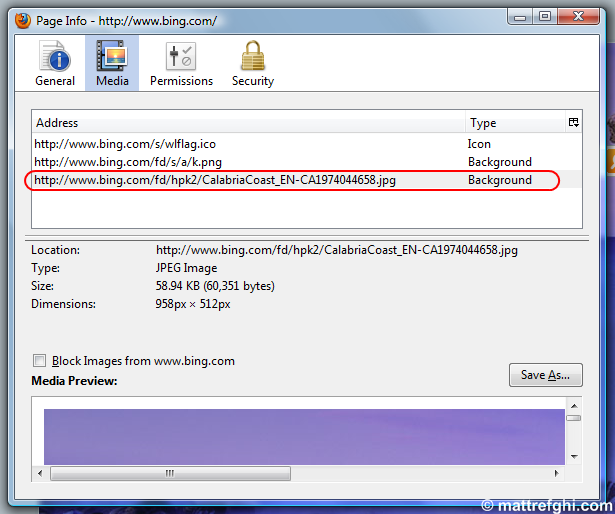
Using Mozilla Firefox's Page Info feature to find the Bing background filename.

Using Mozilla Firefox

  1. Right-click anywhere on the Bing page.
  2. Select “View Page Info”.
  3. Click the “Media” tab.

You’ll see the background listed along with other images. See the screenshot.

Safari 4

  1. Right-click anywhere on the Bing page, and select “View Source”.
  2. Click CTRL+F, and then type in “.jpg” as the search term.

Cycle through the search results – there should only be three. You will find that one of them is actually background image URL.

Steam: Fallout 3 failed to start (error code 80)

Here’s a really quick one: I kept getting this error when I tried to launch my recently purchased copy of Fallout 3. I googled around a bit, and while I found people with the same problem, no fixes were available.

"Steam - Game Launch Failed" error dialog

Solution

While not an actual solution, I’ve been able to circumvent this problem by closing Steam, and re-opening it. This will allow you to launch the game successfully, but only once. If you quit the game, and try to launch it again, it won’t work. To get it to launch again, simply repeat the process – close Steam, re-open it. I’ll try and figure out how to fix this once and for all.

See Also

Steam Forum Post – Fallout 3 fell over and went boom 🙁

UPDATE January 8, 2023 – Old comments posted to my previous site can be seen here.

File Locking: Access Is Denied? Not Anymore.

I’m sure most of you have encountered this type of error, at one time or another, while using Windows:

The "Error Deleting File or Folder" dialog shown when you attempt to delete a file that is in use.

It appears when you try to delete a file or folder that is currently in use by an application. To be completely accurate, the file needs to be in use and locked by the application to prevent external edits – the lock is likely the reason we see the error message. Sometimes it is really obvious which application has a locked handle on the file – for example, if it is complaining about a Word document – perhaps the document is still open in Word. Personally, I consider scenarios like that acceptable because they can be solved easily; unfortunately, all too often I get into trickier situations where I can’t figure out which application is holding onto my file. In those cases, I used to just reboot, and that would usually solve the problem. Yet, there were still cases where rebooting didn’t even do the trick.

Eventually, I was tired of struggling in those moments, and began searching for an application that could help – that’s when I found Unlocker. It allows you to remove locks from individual files via an “Unlocker” option within the Windows context menu. Definitely a nice feature… but listen to this – they took it a step further via  a system tray program called Unlocker Assistant. If you encounter the “Access is denied” error while Assistant is loaded, Unlocker will automatically pop up a few seconds after you click “OK”, and it will show you the culprits:

Unlocker Assistant showing the processes that have a hold on the locked file.

From their interface, you have the option of either killing the process, or unlocking the files themselves – effectively breaking the hold the application has on the file without having to terminate it. Very handy. You can download Unlocker here.

If you’re more inclined to trust Microsoft-sanctioned applications, grab Process Explorer – a Sysinternals app. I didn’t try it for this purpose specifically, but from what I’ve read, it isn’t as simple as Unlocker when it comes to removing the “Access is Denied” error specifically. It serves multiple purposes, whereas Unlocker is specialized.

Firefox: Failure In Chrome Registration

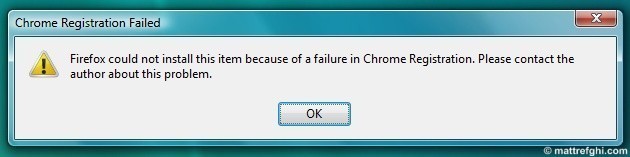
Lately, I’ve been getting 2-3 of these errors whenever I try to open Firefox:

"Chrome Registration Failed" error dialog that appears when you try to open Firefox.

I tried re-installing it, and also repairing it – but neither solved the problem. After spending some time googling to find a solution, I found a great knowledgebase article from the Mozilla guys themselves. Since it was difficult for me to find, I decided to offer the solution here too. Here’s the description of the problem, from the article:

The term chrome has been used in Mozilla development for 10 years, referring to the that part of the Firefox window that lies outside of a window’s content area. Toolbars, menu bars, progress bars, and window title bars are all examples of elements that are typically part of the chrome. It is in no way related to Google Chrome.

Chrome registration is something each Firefox add-on must do to work in Firefox. While some add-ons come with the appropriate chrome.manifest file, other add-ons rely on chrome.manifest being automatically generated when you start Firefox.

Chrome registration failure can occur when an add-on has come bundled with Firefox and you don’t have system rights to edit files where Firefox is installed. (Thus chrome.manifest cannot be generated.)

As for how I happened, I suspect it was either the fact that I applied a System Restore state recently, or a NoScript update I downloaded was flawed.

Solution

To fix it, I ran Firefox with administrative privileges once – and never saw the error messages again. The Mozilla article offers additional instructions, if that doesn’t fix your problem. See below.

To prevent this error from happening again, you need your system administrator to log on with an administrator account, and run Firefox at least once.

(Windows Vista) Right-click the Firefox icon in the desktop and select Run as Administrator.

If that isn’t an option, you can disable the offending add-on.

3:
  1. At the top of the Firefox window, click the Tools menu, and select Add-ons.
  2. The Add-ons window will open. In the Add-ons window, click the Extensions panel.
  3. A list of installed extensions will be displayed. If you see any extension that you did not install yourself, select it, and click Disable.
  4. Above the list of extensions, click Restart Firefox.
  5. If the error still occurs, try disabling a different extension.

See Also

Firefox Knowledgebase Article – Chrome Registration Failed

Subversion: Repository Has Not Been Enabled To Accept Revision Propchanges

Last night I set up Subversion on my main development machine, which is running Vista. To do this, I followed the steps outlined by Jeff Atwood on his Coding Horror blog. His article was very helpful – it allowed me to install Subversion rather painlessly, despite the few HTML glitches I encountered in his instructions.

This morning, I opened the “Show log” page for a particular file using TortoiseSVN, and noticed one of the revisions I checked in was missing a comment. I right-clicked it, and selected “Edit log message”, wanting to add a comment then and there.  A little text editor popped up, and I typed the message. After I pressed OK, I was hit with this:

Repository has not been enabled to accept revision propchanges; ask the administrator to create a pre-revprop-change hook

Solution

To correct this, I needed to create a file in the “hooks” folder of my Subversion repository. On my system, it was located at C:svnrepositoryhooks. I created a file called “pre-revprop-change.bat”, and I set the contents to this:

rem Only allow log messages to be changed.
if “%4” == “svn:log” exit 0
echo Property ‘%4’ cannot be changed >&2
exit 1

This solution was suggested in the TortoiseSVN documentation.

After saving the file with those contents, I was able to edit the revision comments without encountering the error message.

See Also

TortoiseSVN Users Mailing List: RE: Labels and Comments

TortoiseSVN Documentation: Server side hook scripts