Dragon*Con 2012 Interviews: Magician in a Hat

Transcription

Matt Refghi: Alright, so I’m here at Dragon*Con 2012, and I just saw this gentleman. I have to ask: did you wake up this morning and think “today, I’d like the rabbit to carry me around?”

Michael Mirth: (laughs) That’s ri – well, he said so, actually.

Matt: Yeah.

Michael: I didn’t have much to do with it, really.

Matt: That’s – alright, that’s pretty elaborate.

Michael: I’ve been wanting to bring this costume to Dragon*Con for about seven years, since I’ve made it. But I never had a trailer, because it’s so large – it wouldn’t fit in my jeep.

Matt: Yeah, it’s pretty elaborate.

Michael: Yes, there’s a lot of parts to it.

Matt: Alright, so where did the idea come from? Where did this – I need to know.

Michael: (laughs) Well I once saw someone that had a rabbit costume with an Easter egg, and inside the Easter egg he was carrying a person. And I thought, I’m a magician, so I could do that with a magic hat. Then I could walk in parades, do grand openings, and that sort of thing. So I built the costume for those kinds of venues.

Matt: Very nice, and so you’re a magician – is there a domain or a site you’d like to mention?

Michael: Yes, it’s michaelmirth.com.

Matt: Repeat that? Sorry.

Michael: My name is Michael Mirth, and the site is michaelmirth.com.

Matt: Okay, excellent.

Michael: Thanks for the plug!

Matt: Yeah, no problem. Is this the first time you come to Dragon*Con?

Michael: No, I’ve been coming to Dragon*Con for about seven years, and I’m typically a vendor. But evenings, you know, the costume is the party, basically, so I like to be part of this as well.

Matt: Very good. You look comfortable, how are you feeling?

Michael: It’s not too bad! This is fiberglass, so it’s not terribly weighty, and it weighs about the same in back as it does in front, so it’s balanced front to back.

Matt: Okay, and maneuvering in this?

Michael: Not too bad. Well, it’s all up to the rabbit, really, I don’t have much say in it.

Matt: That’s right, he’s doing a good job.

Michael: He is, he is. But it’s really all me, you know.

Matt: Is he expecting a carrot on the way home?

Michael: (laughs) Yeah, you guys didn’t?

Matt: Oh, we didn’t expect rabbits to carry people around.

Michael: Because that’s in the contract, man. Magician animals union, he wants a limousine after this.

Matt: (laughs)

Michael: (laughs)

Matt: Alright, it was a pleasure talking to you – excellent costume, excellent costume.

Michael: My pleasure, thank you so much.

Matt: Thanks.

Credits

Featuring: Michael Mirth

Filmed by: Joseph Pereira
Dragon*Con 2012 Interviews: Maurice Moss

Transcription

Matt Refghi: Alright, so we just arrived at Dragon*Con 2012, and we encountered Moss from The IT Crowd. How are you doing, Moss?

Maurice Moss: (British accent) Doing well, thank you.

Matt: Alright, I see that you have a cup there.

Moss: (British accent) Absolutely, I’ve searched the canteen completely and most thoroughly, and I’ve actually found my cup.

Matt: Woah.

Moss: (British accent) It’s very, very distinctive because there’s a picture on the base.

Matt: Okay, alright. How do you differentiate between that cup and the other cups.

Moss: (British accent) Well, mainly the picture is what does it, although I do see Richmond drinking from it from time to time, which makes me a little bit vexed.

Matt: I thought he died from scurvy.

Moss: (British accent) He did. But then later he came back, as you know, from goth to boss?

Matt: That’s right.

Moss: (British accent) Absolutely. Quite surprising.

Matt: I see, and I see you’re also wearing a very interesting shirt right there.

Moss:  (British accent) Oh, well, yes, see, unfortunately, it is the week-end, and since it is the week-end, Aunt Irma visits.

Matt:  Oh, yeah.

Moss: (British accent) Sometimes, it gets a little bit wonky with our emotions and breast tenderness, it’s a little embarrassing to be quite certain.

Matt: I see. So I see you’ve embraced it, it seems that you like to show off this image, now. How is Jen doing, by the way?

Moss: (British accent) Well, Jen unfortunately couldn’t make it… because of Aunt Irma.

Matt: Because of Aunt Irma.

Moss: (British accent) It gets a little bit unwieldy having her out of sorts with her wild hair and her womanly ways, and all sorts of things that aren’t necessarily proper for small children or… anyone.

Matt: Probably a wise decision, yes. Alright, so how long have you been coming to Dragon*Con?

At this point Lucien stops speaking in character, and drops the British accent.

Lucien: I’m going to break character I guess, for that one since it’s a knocker, but I first started in 1996, so I’ve been coming for… 16 years. Yeah, 16 years, that’s a long time.

Matt: Yeah, so you’re from the area, I take it?

Lucien: I’ve lived in Georgia for about half of my life, I was originally from California.

Matt: I see.

Lucien: So I moved out here, and go back and forth quite frequently to visit family, stuff like that, so. How long have you been being coming to the Con?

Matt: This is my third year, and his first year.

Lucien: Awesome, first year. Nice!

Matt: First year, yeah. And we just arrived, and just bumped into Lucien who also – when I came here last year, I saw him, and thought he had the best costume.

Lucien: Thank you sir, I appreciate that. That’s awesome, dude.

Matt: You’re welcome. So I wrote a blog post, and he happened to find it randomly, so it’s just really funny that the first person I encounter here is Lucien. So, very good, and you’re rocking that uniform again, I like.

Lucien: Absolutely.

Matt: Like the accent, you really have that down.

Lucien: I try, sometimes it gets hard, like his pronunciation is a little weird after certain vowel sounds, so it’s really hard to capture it. But, I do the best I can, you have to practice for like weeks in advance.

Matt: That’s some dedication.

Lucien: It is.

Matt: I see you also embody the body language.

Lucien: Yes, that’s really important. That was killer for me, because if I’m going to do the costume, I feel it’s important to be in costume, I think it’s important to be in character all the time. When I have my next one on which is, like I said his character from The Watch, I try to – he doesn’t have much speaking parts in that, but he’s – I don’t want to spoil it on camera since you haven’t seen it, but I have a prop from it that’s very distinctive.

Matt: I see.

Lucien: Hopefully, you know, it’ll be – his character is similar, so it should be easy.

Matt: Okay, so it’s been a pleasure meeting up with you, and by the way, just so you know, we come from Montreal, Canada.

Lucien: Oh, seriously!

Matt: We fly down, yeah.

Lucien: That’s awesome. Yeah, everyone comes from all around, that’s always nice. I have a guy who came, I met him yesterday, he’s dressed as Rimmer from Red Dwarf –

Matt: Okay. I’m not familiar with it, but go ahead.

Lucien: It’s an old 1980s British sci-fi comedy –

Matt: Right.

Lucien: He’s here, and he came from Australia.

Matt: Nice.

Lucien: First Dragon*Con, awesome.

Matt: Very nice. Great, so yea, good seeing you and  –

Lucien: Absolutely.

Matt: So see you again.

Credits

Featuring: Lucien Freeman

Filmed by: Joseph Pereira

Dragon*Con 2012 Interviews: Steampunk Bartender

Transcription

Matt Refghi: Hi, everyone, I’m here with a cosplayer, and I’m not entirely sure what his costume is, but it feels like Steampunk. If you could just explain a little more about the costume.

Baron Bon Bar: Yes, it is Steampunk. I’m a Steampunk bartender by the name Baron Bon Bar. German, Baron Good Bar. If you can check this out, I’ve got my shotgun.

Matt: (laughs)

Baron: I carry the bardolier (?) , and the Bar Back –

Matt: Oh, wow. (laughs) This is –

Baron: – which caries two fluid gallons which is pneumatically displaced through this glove.

Matt: That is… community service if I’ve ever seen it. That is excellent.

Baron: Well, that’s what Dragon*Con’s all about: sharing, having a good time… I just want to help everyone else have a really good time at the convention.

Matt: Excellent, that’s great. Alright, so is it your first time at the ‘Con?

Baron: No, I’ve been coming here several years, now, and actually the first year we came we liked it so much that we bought a lifetime membership.

Matt: Excellent, yeah, I’ve heard about those, it’d be great to have one. And are you from the area?

Baron: No, actually, I’m from St. Louis, Missouri.

Matt: Nice, I – for some reason, growing up, I loved the Blues.

Baron: Well everybody loves the Blues.

Matt: I love in Montreal, it’s weird. Canadian, loving the Blues, Saint-Louis Blues.

Baron: Everybody loves them til’ the playoffs. (laughs)

Matt: Oh, that could be – yeah. Alright, very good, what is the best thing for you about the Con, what do you enjoy the most? Apart from just, as you mentioned, you know, sharing and providing this great service.

Baron: Well, not only is it a collection of some of the best minds inside of fandom talking about their particular niche interest, exchanging ideals, it’s a place where we can come and see the creme of the crop of everything that is geek, nerd, that subculture. But also, for me personally, you get to see some of the top costumes in the nation. They say that Comic Con is the best Con in the world, but it’s not true, it really is Dragon*Con, because the costuming here at Dragon*Con takes it to another level. People that are the best inside of a whole state come here and don’t even hold up a candle to some of the people that just come in for just this Con, this is the only one they do.

Matt: Right. Haven’t been to Comic Con, so I take it you’ve been?

Baron: No, actually I haven’t, but I’ve had several friends and –

Matt: Right.

Baron: – as I said, I know a lot of the professional costumers here. They can attest that it’s a lot harder to costume here on a professional grade than it is to do it at Comic-Con.

Matt: Well, I certainly believe that because I’ve been coming here for three years, and I’m not stopping anytime soon. So I really enjoy it, and also I was wondering – this is an elaborate  costume, you likely had to make some of these parts by myself.

Baron: I made almost 100% of this costume myself.

Matt: Very nice.

Baron: There are parts on it that are scavenged from other things, but I’m the one that assembled them all. Like these are test tubes from a centrifuge. This is a completely modified squirt gun that I changed over to accept glass bottles. There are standard flasks and things like that, but the leather work and all of the devices are completely hand-made.

Matt: Very nice. I also noticed a little Bat symbol there.

Baron: Well, this is my, uh, actually something I wear in my daily life.

Matt: And you have chopsticks.

Baron: Well, it’s my cellphone, my BlueTooth, charging cable, chopsticks, and a pen. It’s all things that I use pretty much every day, and it’s a little of the Con that I carry home with me.

Matt: That is excellent, and it’s just like you’re blowing my mind here because I thought that this was a Steam Punk costume, you have some great gadgets, but you’ve covered the whole practicality angle as well. (laughs) Look at this! He just pulls out his cellphone, just hank on the cord. Excellent. And you’re ready for sushi, what else do you have here?

Baron: That’s a charging cable for the cellphone and data cable.

Matt: Perfect, perfect…. so you’re one equipped man. Excellent. So, yeah, it was a pleasure speaking to you sir.

Baron: Well, I hope you have a fantastic Con.

Matt: Thank you.

Baron: Thank you for having me on your blog.

Matt: Absolutely, I appreciate that.

Credits

Featuring: Baron Bon Bar

Filmed by: Joseph Pereira

Interviewing Cosplayers at Dragon*Con 2012

It’s no secret that I’ve been less active with this blog, as of late. I won’t go into the details, but I’ve been putting a lot of time and effort into a certain project, one that I can’t yet reveal. What I can say is that it’s something that I’ve been working on for a very long time, and I’m really looking forward to introducing it in the near future.

Today, however, I’m happy to announce that I’ll be releasing a series of interviews that I hosted from Dragon*Con 2012. I’ve always wanted to expand into video, and this turned out to be a great way to do so. You may recall that I’ve previously mentioned wanting to start a web series, and even posted a video about it. Though it was a good idea, the topic just didn’t feel as natural to me. The idea of interviewing random strangers came to me months ago, as I felt it would be a good way to improve my on-screen speaking abilities. It became a practical possibility when Joseph Pereira decided to join me at the convention, as he had the necessary knowledge and equipment to assist in such an effort. Not only that, but he and I shared interest in the whole world of pop culture references, and we both enjoyed taking pictures of great costumes.

I’ve already uploaded one interview, and it’s with a magician named Michael Mirth. Michael’s costume is a truly unique creation, and I was really pleased to talk to him about it. The other interviews will appear on my YouTube channel within the next couple weeks.

What to Do When WordPress Gets Stuck In Maintenance Mode

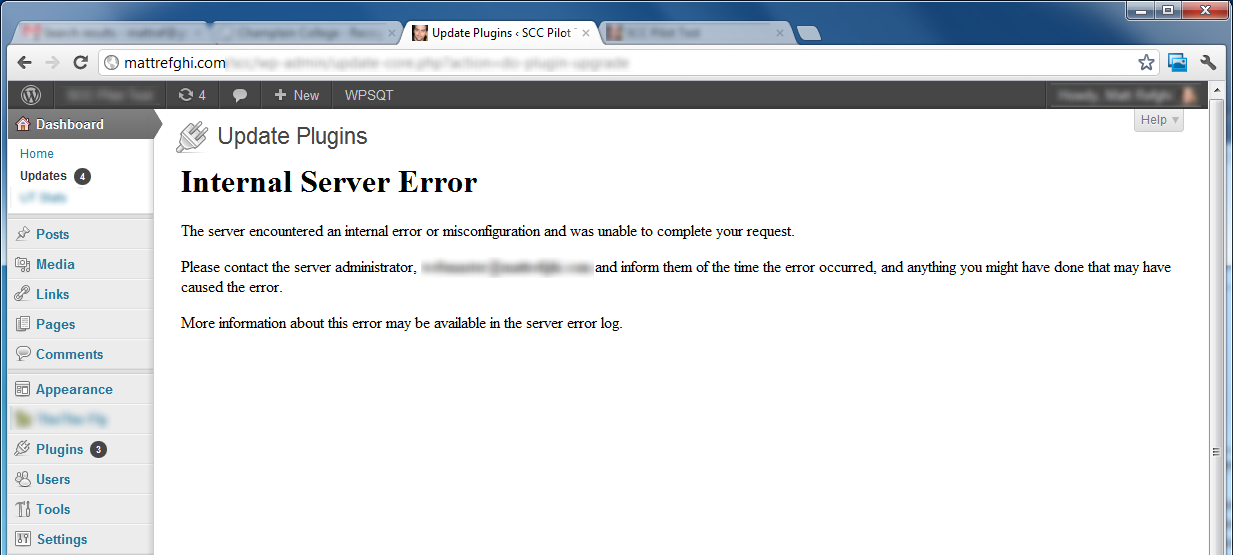
As I was working with WordPress today, I happened to stumble into a webmaster’s horror scenario. It all started when I noticed that some of my plugins were out of date. In an effort to correct this, I selected all outdated plugins, and then clicked the handy little “Update plugins” button. Instead of seeing the progress messages, I was greeted by this:

Internal Server Error (HTTP 500) seen within WordPress' Update Plugins page.

It was the timing of the Internal Server error that made me uneasy – did the upgrade process have time to complete? Any interruption could potentially result in database corruption, so I launched another window and tried to see if everything was working normally. Here’s what I saw:

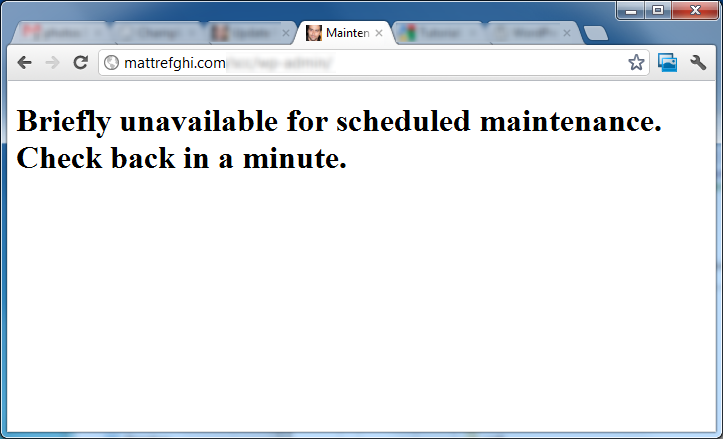
Briefly unavailable for schedule maintenance. Check back in a minute.

Even after a few refreshes, that message remained – which meant that WordPress switched to maintenance mode for the upgrade progress, but since it was interrupted by the crash, it never had the opportunity to disable it. In an attempt to assist, I tried to access the admin interface, only to get the same message. Seeing as I had a minor WordPress apocalypse to deal with, I wondered how I was supposed to repair it.

Solution

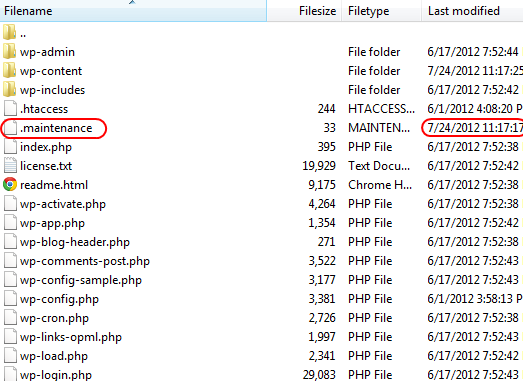
FTP client showing the .maintenance file in the main WordPress directory

Thankfully, a quick web search pointed me to an article where someone encountered and resolved the same issue (emphasis added):

I noticed a strange file in the root of the site called .maintenance. The date stamp was just minutes old, so I deleted it and VOILA, the site was back to normal. So, if you are unable to load WordPress because it’s stuck in Maintenance mode, just FTP into the root directory and delete the .maintenance file.

Good catch, John, and thanks for ending my miniature webmaster crisis.

I’m hoping that the guys at WordPress find a better way to handle cases like these, as the current approach seems somewhat dated. If they were informing administrators before every update, then there wouldn’t be problem. As it stands, victims will either have to search for a solution online, or do some investigating – both of which increase downtime. Please, WordPress… help us keep these horror scenes short.

See Also

Tutorial: Manually Take WordPress Out of Maintenance Mode

Subversion: Repository Backup Script

A few months ago, my Windows installation became corrupt, and despite my best efforts, I had to format the hard drive. I’m the type of guy that makes a whole lot of backups, so I proceeded to format with confidence. I did, of course, make a few last minute exports just in case. Unfortunately, I didn’t realize that there was something wrong with one of the most important items on my checklist: my primary Subversion (SVN) repository. To my surprise, the backups only included the revisions that occurred prior to November 2011. While horrifying, I remembered that I at least had the live version of my working directory.

Unfortunately, I turns out I didn’t. Something strange happened to that directory – all files had disappeared from the root, and only sub-directories (and their contents) survived. It had been a while since I worked on the project, so I didn’t realize that this had happened. My automated backup procedure was therefore copying a broken directory, without my knowledge. Once my panic settled, I began to calculate exactly how much work I lost. Thanks to the remaining sub-directories, I was able to recover parts of certain changes, instead of losing them completely. In the end, I lost approximately 25 hours of work – which thankfully wasn’t much compared to the overall effort that went into the project.

Interestingly, I had previously formatted my drive in November 2011; however, when I imported my repository, it all seemed to be working fine. I was able to commit, revert, and even view the log of revisions through TortoiseSVN. Put simply, the process was so smooth that I felt confident in the procedure – and I had never seen any indication that something was wrong. While I still don’t know what caused the problem, I believe TortoiseSVN might have been related. I recall that the version changed, and I was importing my data into a new version, rather than the same. Until I figure out why exactly why this happened, I’ve taken steps to ensure I am prepared for future disaster scenarios. How have I done this?

Solution

With backups, lots of backups. I created batch file that would handle backing up my repository. It creates three types of backups every time it is executed, including:

1. A hotcopy.

This subcommand makes a makes a full “hot” backup of your repository, including all hooks, configuration files, and, of course, database files.

2. A dump.

Dump the contents of the filesystem […] in a “dump file” portable format.

While this command allows for incremental backups, and selecting only a subset of revisions – I’m using it to export all revisions, as a full backup. Excessive? Yes, it most certainly is – but I’d rather not have a repeat of the previous experience.

Due to the excessive nature of this command, the script uses 7-Zip to reduce the resulting dump size.

3. A copy of the working directory.

Just a simple xcopy; the idea is to ensure that I at least have the latest version of the code, if everything else fails.

For now, the script is working well – but I’ll likely run a few more tests to ensure that the backups are truly reliable. Since they’re created by interacting with SVN directly, rather than going through TortoiseSVN, I’m more confident that they can be trusted. In the meantime, I figured some of you might find it useful.

Also, instead of executing the script via Windows Scheduler, I decided to put it in my taskbar instead. It wasn’t as easy as I originally thought, so feel free to read the following blog post for an explanation:

How to Pin a Batch File to the Taskbar in Windows 7.

Download

You can view the source here.

You’ll need to go through and add your own file paths, naturally, including the path to the 7-Zip executable.

See Also

What is the best way to backup subversion repositories?

Using timestamps in batch files

Dropbox: Certain Files Won’t Synchronize

Here’s a very interesting problem I encountered just last week. I was speaking to a colleague over the phone, and she told me that she had placed a particular document in a folder that we both shared on Dropbox. I looked into that folder, but was unable to locate the file that she spoke of. At that point, I realized that the Windows client really had no way of reporting whether it synchronized properly, or not. No matter what I did, the Dropbox client was convinced that everything was synchronized.

Since I wasn’t getting much information from the desktop client, I decided to log into the website. Surprisingly, the file was visible from the web interface – but it wasn’t appearing on my computer. Here’s what it looked like, roughly:

A word document titled "5E:Dolphins.docx" can be seen in the Dropbox web interface.

Notice anything… uncommon? It’s not often that I see colons in filenames, and so the sighting stood out to me. I then recalled that my colleague used a Mac, rather than a PC. I had a feeling that the colon character was invalid in Windows, and I decided to test my theory.

Solution

Sure enough, Windows blocked me from creating a text file with a colon in the filename, and it showed me the following message:

A filename cannot contain any of the following characters:
/ : * ? ” < > |

To fix the problem, I simply asked my colleague to remove the colon from the filename. As soon as she did, Dropbox downloaded the file to my computer, and all was well. It turns out that this problem is well documented on the Dropbox help site, and that they even created a tool that helps identify problem files.

In the end, I feel it is Dropbox’s responsibility to improve the way the client reacts to such problems. Without my background in Computer Science, I probably wouldn’t have discovered the source of the problem within a reasonable time. Unfortunately, it seems that the issue isn’t getting many votes within Dropbox’s suggestion forum. Let’s hope they decide to implement it anyway, to improve the quality of their service.

See Also

Dropbox Help: Why aren’t certain files on one computer syncing to another?

How to Pin a Batch File to the Taskbar in Windows 7

One of my favorite features in Windows 7 is the taskbar, as it combines the convenience of Vista’s Quick Launch, while organizing windows in a more intuitive manner. I’ve grown accustomed to dragging program shortcuts into it, and having them remain there permanently. That is, until this morning. For some reason, I discovered that Windows wouldn’t let me drag a batch file to the taskbar.

In DOS, OS/2, and Microsoft Windows, batch file is the name given to a type of script file, a text file containing a series of commands to be executed by the command interpreter.

Even when I right-clicked the file, I didn’t see the typical “Pin to Taskbar” shortcut. Seeing as batch scripts can execute programs within themselves, I was surprised they were being blocked. After running a few web searches, I found a solution to the problem, and felt it would be worthwhile to share it here.

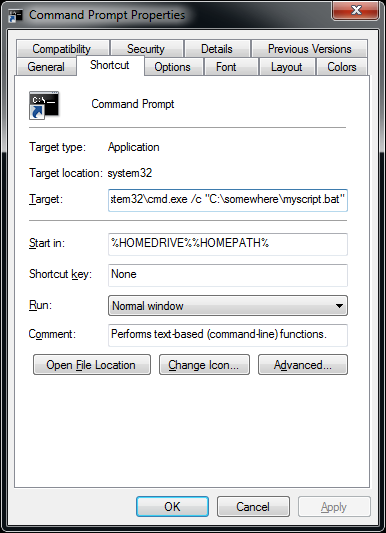
For the sake of this tutorial, let’s assume that we’re trying to pin a batch file titled “myscript.bat” to the taskbar. Since we can’t pin it directly, we’ll be using a trick that involves the Windows Command Prompt. Here’s how to do it:

A Command Prompt window with the Target field in view. It has the addition discussed in this tutorial.

  1. Click the Start button.
  2. Start typing “Command Prompt” in the search box.
  3. Right-click Command Prompt once it appears in the search results, and select Pin to Taskbar.
  4. While holding SHIFT, right-click the black Command Prompt icon in the taskbar.
  5. Select Properties from the context menu that appeared.

Now we bring our attention to the value in the Target field:

%windir%system32cmd.exe

As it stands, it’s just trying to launch the executable that will make the Command Prompt window appear. For our trick to work, we must add the follow text, in bold:

%windir%system32cmd.exe /c “c:somewheremyscript.bat”

The “/c” parameter tells “cmd.exe” that it should only run the command provided, and then immediately close itself. In this case, we’re telling it to launch a batch file, and that file can run any number of commands within itself. The path, naturally, should reflect the actual location of the file on your machine.

Once this is set up, we can simply click the black Command Prompt icon to launch our script. I have no idea if Microsoft plans to improve support for such files, but in the meantime, I consider this a decent workaround.

The Monk and the Gorilla

It was around the time where I was getting to be too old for Halloween, so I didn’t do the whole candy collection thing. Instead, I served as a candy dispenser for the kids who wandered over to my parent’s place. I decided I would also dress up to entertain the children that passed, but I wasn’t exactly sure of what I would do. All I knew is that I had a mask, and a monk’s robe.

The mask was designed to make my head look like a large, sinister skull. Not quite unique, I know, but this one was different – when I first saw it, it struck me as being particularly high in quality. As a result, I couldn’t help it – I had to buy it. I didn’t have any specific plans, but I knew that somehow, somewhere, the mask would be entertaining. In fact, it reminded me of the time I bought a giant stuffed bear, another occasion where I felt the potential for comedy outweighed the price.

The skull mask

It’s also worth mentioning that I bought the skull mask in a very strange location – it was in a theatre supply store that occupied the entire first floor of an old skyscraper. And by old skyscraper, I mean from looking at the exterior, you immediately wonder why they haven’t demolished it yet. I imagine the foundation was strong enough to warrant keeping it open. Still, the exterior showed some serious wear and tear, and the majority of the floors were visibly abandoned.

But the building never collapsed under my weight, or anything. In fact, there were two other businesses in there, both of which were gyms. I knew this because I was a member at one of these gyms, and I often went to work out after school. Despite the existence of these small pockets of life, the building always seemed better suited as a location to film a horror movie. I suppose it’s therefore appropriate that I should find a creepy-looking mask there.

As for the robe, there was really nothing special about it – it was brown, had a hood, and when I wore it with the mask, it made me look like an undead priest of sorts – and a large one, at that. So it was in this attire that I took a seat outside of my house’s front door, on a lawn chair. Every now and then, I’d stand up and slowly make my way around the front porch, head bowed and arms joined.

Eventually, a mother took notice of my seated figure, and I could hear her explaining the sight to her child. I could tell from her voice that she was on the sidewalk, which was easily six metres away from me. The distance actually added to the scene, as the lawn itself was dark – the only light was next to the me, the undead priest.

Since I knew someone was watching, I felt a certain need to entertain. I therefore gradually made my way back into the house to seek out my brother. He had a gorilla mask, but no costume to speak of. We discussed how we could bring his mask into the scene, and arrived at a decision. Soon afterwards, I found myself back at my post, with the mother and child still present. My gorilla-faced brother then exited the building, and stood before me. Apart from the mask, he was dressed as a civilian.

For some reason, we decided it would be entertaining to stage a fight between both he and I. According to the plan, I threw him to the ground, and started to swing fake punches at him. He groaned along with my fake hits, playing into the scene. Unfortunately, what might have been entertaining for 16-year-old boys was certainly not entertaining for the little child who was witnessing this. After all, if the mother had to explain the scene, then the kid couldn’t have been very old. Once the fighting started, I heard the woman gasp, and then the shuffle of her leading her child out of there.

ACHIEVEMENT UNLOCKED: Traumatized an innocent child.

I know, not my finest moment – but it’s not like I got out of bed that morning, and decided I’d traumatize a child. If anything, the mistake allowed me to exercise more caution around children. After all, they should be allowed to keep a certain innocence until they are inevitably introduced to TV, movies, and the like. Dressing as a creepy skull-faced monk was probably scary enough. Probably

Thoughts On Cross Browser Testing (And a Tool to Simplify the Process)

If I were asked to identify one primary annoyance associated with a web development career path, it’d be the abundance of browser inconsistencies. From the consumer’s point of view, the web is an endless source of content, and they are given the ability explore that world. Browsers permit such exploration, but the resulting experience depends on a multitude of factors, most of them transparent to the consumer.

There’s an organization known as the World Wide Web Consortium (W3C), and their entire goal in life is to ensure the long term growth of the Internet. In accordance with this objective, the W3C took the time to define standards for the core technologies they created, such as HTML and CSS. Yet, the reality is that browser developers don’t necessarily adhere to these standards, as there’s no way to enforce their adoption. While some respect the standards, others instead travel the road of partial compliance, with proprietary technology added in. As a result, when a consumer tries to access a website, he may face a situation where it:

  1. loads properly, and all appears to run well.
  2. encounters issues when loading, but remains usable.
  3. encounters issues when loading, resulting in a broken interface that cannot be used.
  4. refuses to load, and asks the consumer to launch a supported browser.

Even with the best outcome, scenario 1, there may still be “problems” that are invisible to the user. For example, it is very possible that the source code includes browser detection logic that is used to cater the content to the consumer’s browser. If all browsers supported the standards fully, such handling would be unnecessary, and developers wouldn’t need to worry about browser-specific code. As a result, the web would speed up for all. On desktop computers, that performance gain won’t necessarily be crucial to the experience; however, keep in mind that mobile phones are increasingly web-enabled, and yet, have a fraction of the resources that desktop computers do.

Scenarios 2 and 3 suggest that the website creators may not have devoted enough time to testing with different browsers. After all, in most cases, a website should be identical regardless of what browser is being used to access it. Without such a guarantee, some users may suffer a flawed experience.

Scenario 4 is rare, but is usually encountered in a business context with highly specialized web applications. The rejection of a particular browser doesn’t necessarily mean that the standards weren’t being followed – perhaps the web application was designed to take advantage of one specific browser’s feature, one that isn’t offered elsewhere. This is not necessarily a bad thing, though I would argue that it enforces limits that would otherwise not be there. However, if we’re talking about a public website that refuses a visitor solely because they are using a specific browser, I’d consider it more of an insult to the open nature of the web.

So finally, a web developer must take browser differences into consideration. Thankfully, things are improving – for example, the infamous Internet Explorer 6 is now finally on its way out. Good news, sure – but it isn’t a magic pill. There are still plenty of browsers and browser versions out there, and like it or not, they differ. To test properly, a developer must have a way to run their code in multiple browsers, which usually requires the use of virtual machines. At least that’s how I used to do it, until I found a better approach.

Meet BrowserStack, a web-based cross-browser testing tool. How does it work? Well, it’s actually a pretty clever idea. Users are simply asked to enter the site they wish to view, the browser they want to view it with, the browser version, and the operating system. They will then be given web access to a virtual machine that has the requested webpage loaded, in the right environment and browser. Here’s an example below:

The panel on the left makes it very easy to change any of the parameters, while also offering popular debugging tools. I was initially impressed by their ability to switch between configurations with relative ease. Then, I found out that they also allow you test local content by using SSH tunnelling – now that, I found even more impressive. Add the fact that they have multiple versions of Safari, Chrome, Firefox, Internet Explorer, and Opera – and you’ve got quite a service.

For those interested in testing it out, they’re offering 30 mins of use for free, but beyond that, you’d have to look at their pricing plans. If I were still doing web development as a full time job, I’d love to have access to such a tool – the time it saves would add up quickly.

Photo credit

Photo by Johan Larsson .