Skip to content

November 25, 2010

13

How to Launch Multiple Instances of Notepad++


Notepad++ is my primary text editor, as it offers a huge amount of features, and yet remains fairly simple to use.  After months of using it heavily both at home and at work, I began to wonder if I could launch multiple instances of it at one time. Given that I have two monitors in either case, I thought it would be interesting to have one Notepad++ window per monitor.

The best approach I found makes a new copy of Notepad++ launch every time you use a shortcut. To make this work on your machine, simply do the following:How to configure Notepad++ to launch a new copy of itself every time

  1. Right-click any Notepad++ shortcut.
  2. Select Properties.
  3. Move to the Shortcut tab.
  4. In the end of the Target field, add ” -multiInst”.
  5. Click OK.

Example:

  • Target: “C:\Program Files\Notepad++\notepad++.exe” -multiInst

You might be wondering at this point, what if I’m already using Notepad++, do I still have to use the shortcut to launch another? Thankfully, no. To launch another instance when already using the editor, you can simply press ALT + F6, or Click Run -> Open in another instance in the menu bar.
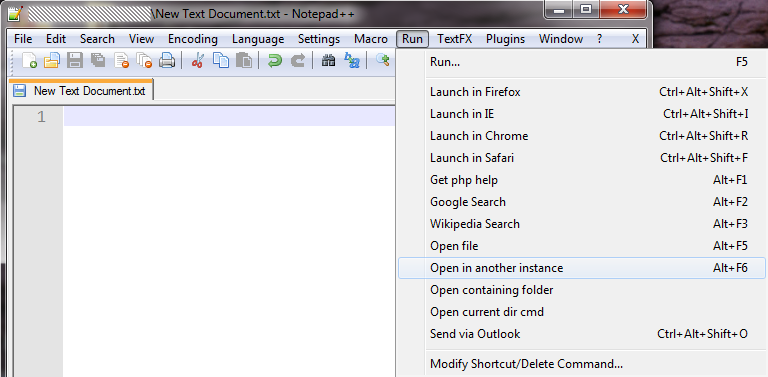
How to open another instance of Notepad++ once you're already within it

Sponsors Your Ad Here
DiggRedditStumbleUponSlashdotShare
  • Thy

    Great tip!

  • Guest

    AWESOME!!!! Thanks!

  • Hedonplay

    It works

    • Simondeford

      Your user name caught my eye, do you live in East Yorkshire?

      • TriCurious

        Is it important?

        • http://www.mattrefghi.com/blog/ Matt Refghi

          Probably not to everyone, no – but I see no harm in it. Perhaps the username is a very indirect reference to East Yorkshire. I can see why he’d be curious to find out if he was right, especially if it wasn’t something anyone could figure out.

  • Sly

    Simply great !

  • Simondeford

    Nice one, cheers.

  • Mathieu901

    Ok, thank you man. It gonna simplify my work :)

  • Spout

    Groovy! Thanks

  • Pradeepb89

    thanks

  • Thakurnp

    Thanks for great tip, unfortunately many plugins simply refused to work in second instance, for example NppFTP

  • Paphlagon

    Or, if you want to spread out your work but only use one instance of Notepad++, try right clicking on the tab and select, “Move to Other View.” I like to spread it out this way across 2 monitors when working between two (or more) files.