As you may know, I sometimes use Jing to take screenshots. Usually, this is when Snipping Tool stops working, and my kill the process trick doesn’t revive it.
Lately, when I booted my machine, I saw this dialog appear:
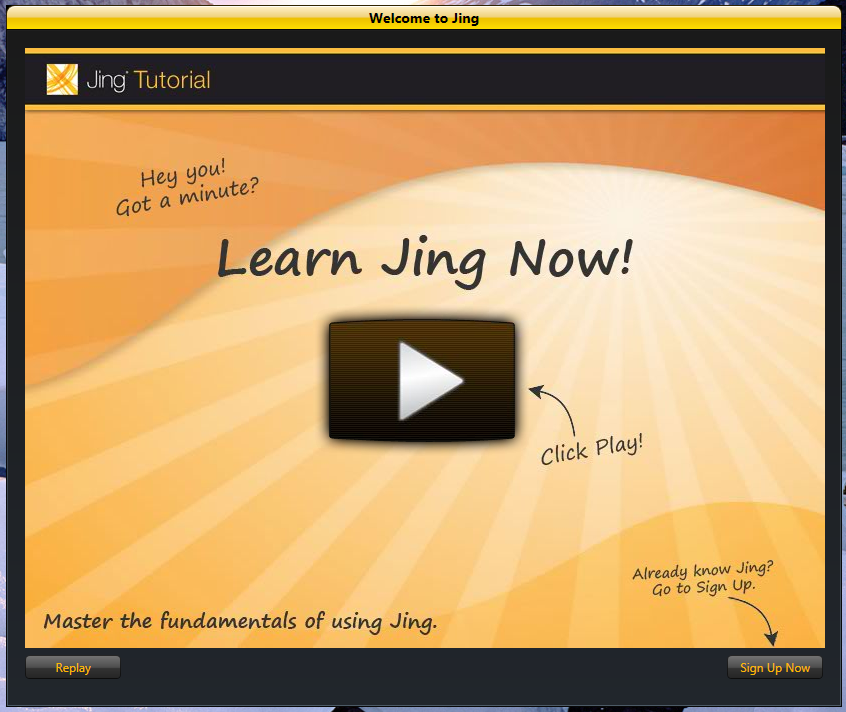
Learn Jing Now? No thanks, I already know how to use Jing. So… what other options do I have?
- “Replay”
- “Sign Up Now”
That’s it. The usual Minimize-Maximize-Close buttons from Windows aren’t there, and I don’t see a Close button. Replay just starts the tutorial video again, and Sign Up Now sounds like I have to register for something . I already created a Screencast account – I remember doing that specifically to satisfy Jing. So, as far as I know, I don’t need to sign up. Yet, the text above the Sign Up Now button seems to suggest that I should click it… but I know I already signed up, why would I do it again? Because of the resulting confusion, I see the dialog as having a poor user interface. While it is visually appealing, I’m really not sure what I’m supposed to click. I’ve also been trained to avoid registration forms – I only use them when I absolutely have to. After all, each time I register somewhere – it takes time, and the information I provide could be exposed in one more location.
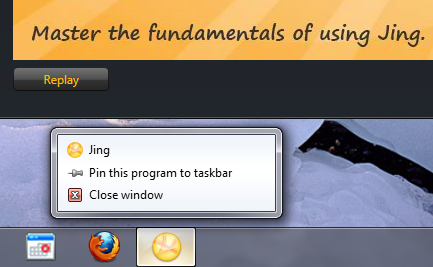
If I decide I want to close the window, I have to get creative… I can either:
- Right-click the window in the taskbar, and select Close Window.
- Press ALT+F4.
- Open Task Manager, and kill the process from there.
It could have been easily averted with a Close button, or at least clearer instructions. If I have to sign up again to use Jing, then tell me why. If I have to click that button to get to the login page, then that’s terrible – just put a Login button alongside Sign Up Now. Either way, make it clear.